Generative Process Intelligence · AI assistant

Minerva 2.0

Ask about your processes the way you would ask a colleague. Minerva reads the causal process graph, draws on your company knowledge and delivers answers, root causes and finished files – right next to your analysis.

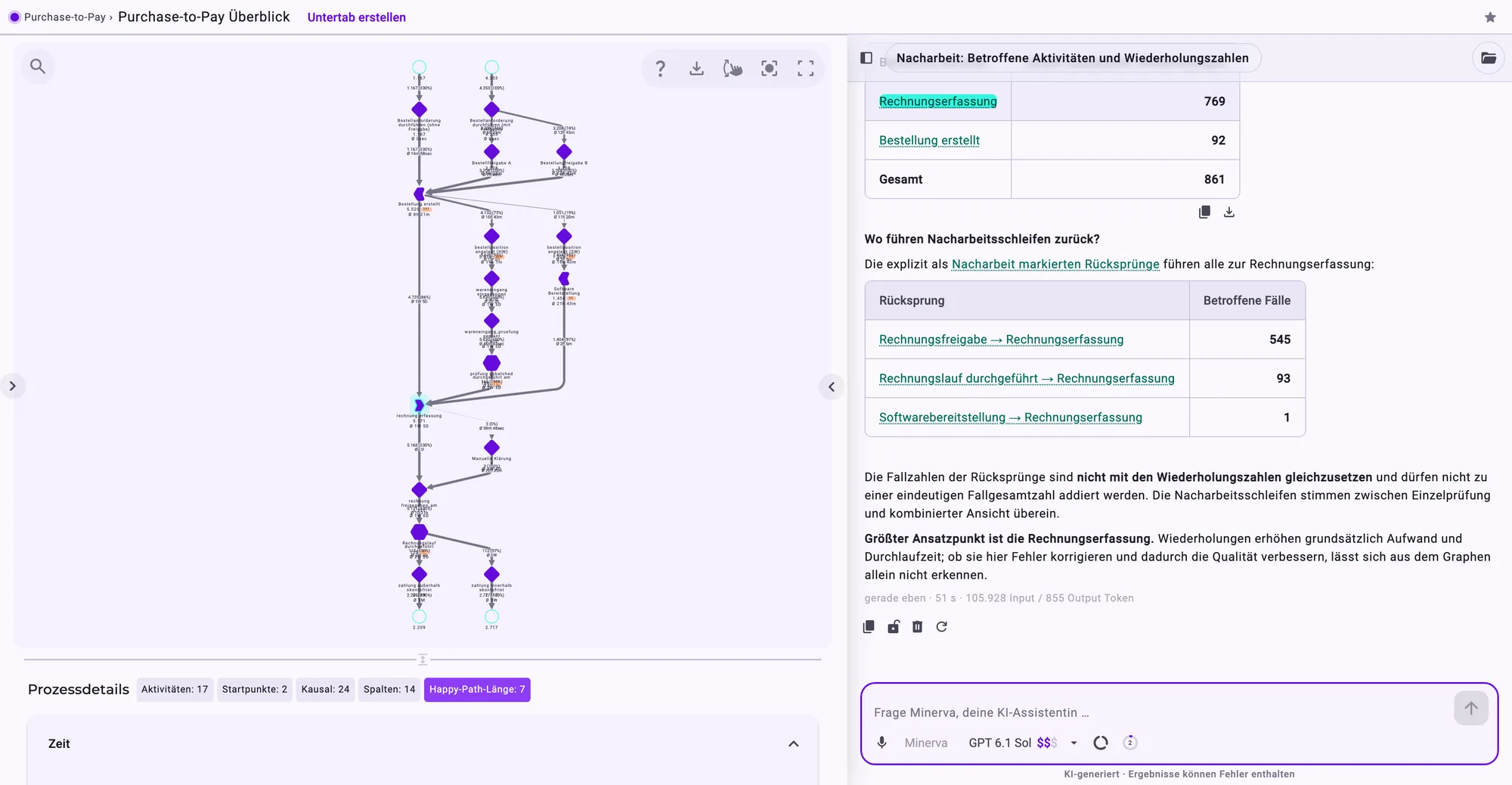
Minerva panel next to an Analyzer tab of the purchase-to-pay process: Minerva answers a question about the open view, and the activity it mentions is highlighted in the process graph.
Minerva answers next to the process graph – and highlights what she is talking about.

What is Minerva?

Minerva is the AI assistant in Noreja. She answers questions about your processes in natural language, explains what she finds and, on request, creates Excel sheets, reports or presentations. To do so she works directly on Noreja's causal process graph: cases, variants, KPIs, deviations from the expected flow and the properties of every activity. What the process data cannot explain – policies, special rules, known issues – she takes from the knowledge your company keeps in the Context Hub.

The result: process mining that does not stop at dashboards and filters. Whoever has a question asks it – and gets an answer with numbers, reasoning and a source.

At a glance

Questions, not click paths

No filter logic, no export to Excel: you ask in plain language, Minerva finds the right perspective, does the maths and answers in the language of your question.

Causes, not symptoms

Minerva combines process data with company knowledge – policies, process descriptions, ticket information – and so explains not only what happens, but why.

Results ready to share

Tables, charts, Excel files, Word and PDF reports and PowerPoint decks in your corporate design – ready for the next meeting.

Your data, your rules

A local model in Noreja's own infrastructure or a cloud model – you choose per chat. Minerva never sees more than you are allowed to see.

From click path to question

What used to take an afternoon is now one question

Classic process mining answers questions you first had to translate into filters, tabs and exports. With Minerva that step disappears.

Instead of …Setting filters, comparing variants, lining up throughput times in Excel
… you ask Minerva

“Compare the variants with rework to the rest: how much longer do they take?”

Instead of …Finding the case in the graph and checking every edge one by one
… you ask Minerva

“Explain the selected case: why did it take so long?”

Instead of …Collecting screenshots and building a presentation
… you ask Minerva

“Make a short presentation with the three most important findings for the process owner.”

How Minerva works

Five building blocks, one answer

Input
Your question
in plain language
Model of your choice
local or cloud
Minervaplans the steps
loads skills when needed
hands large tasks to sub-agents
Reads
Process data from the causal process graph
Company knowledge from the Context Hub
Files in the workspace
Noreja documentation and web search
Result
Answer with tables, charts, graph highlights
Files: Excel, Word, PDF, PowerPoint
A follow-up question if something is unclear

01 · Plan

For questions with several steps, Minerva makes a plan first and then works through it. You see in the chat what she is working on.

02 · Skills

Written know-how for a specific task – such as how rework rates are calculated or how presentations are built. Minerva loads a skill only when your question needs it.

03 · Sub-agents

Minerva hands large tasks to helpers that work on parts in parallel – analysing two perspectives at once, for example – and report back.

04 · Model

The AI model that thinks and writes. You choose it in the chat: local in Noreja's infrastructure or external with a cloud provider, with a transparent price tier.

05 · Data sources

Process data from the perspectives and Analyzer tabs you may open, company knowledge from the Context Hub, files in the workspace, the Noreja documentation and – with selected cloud models – web search.

What Minerva does for you

Six things you notice from the first chat

Minerva panel next to the Analyzer: rework analysis with tables, the activity invoice entry is highlighted in the graph.
The activity she mentions lights up in the graph.
01 · In context

Ask where you are working

Minerva is available as a chat page of her own and as a panel right next to dashboards and the Analyzer. There she can read the open tab, its filters and the element you selected. Short questions are enough:

“Which transition takes the longest on average in this view?”

“Explain the selected case: why did it take so long?”

“What do the filters in this tab leave out?”

Activities and transitions in the answer are linked to the process graph: hover over them and the path lights up in the graph.
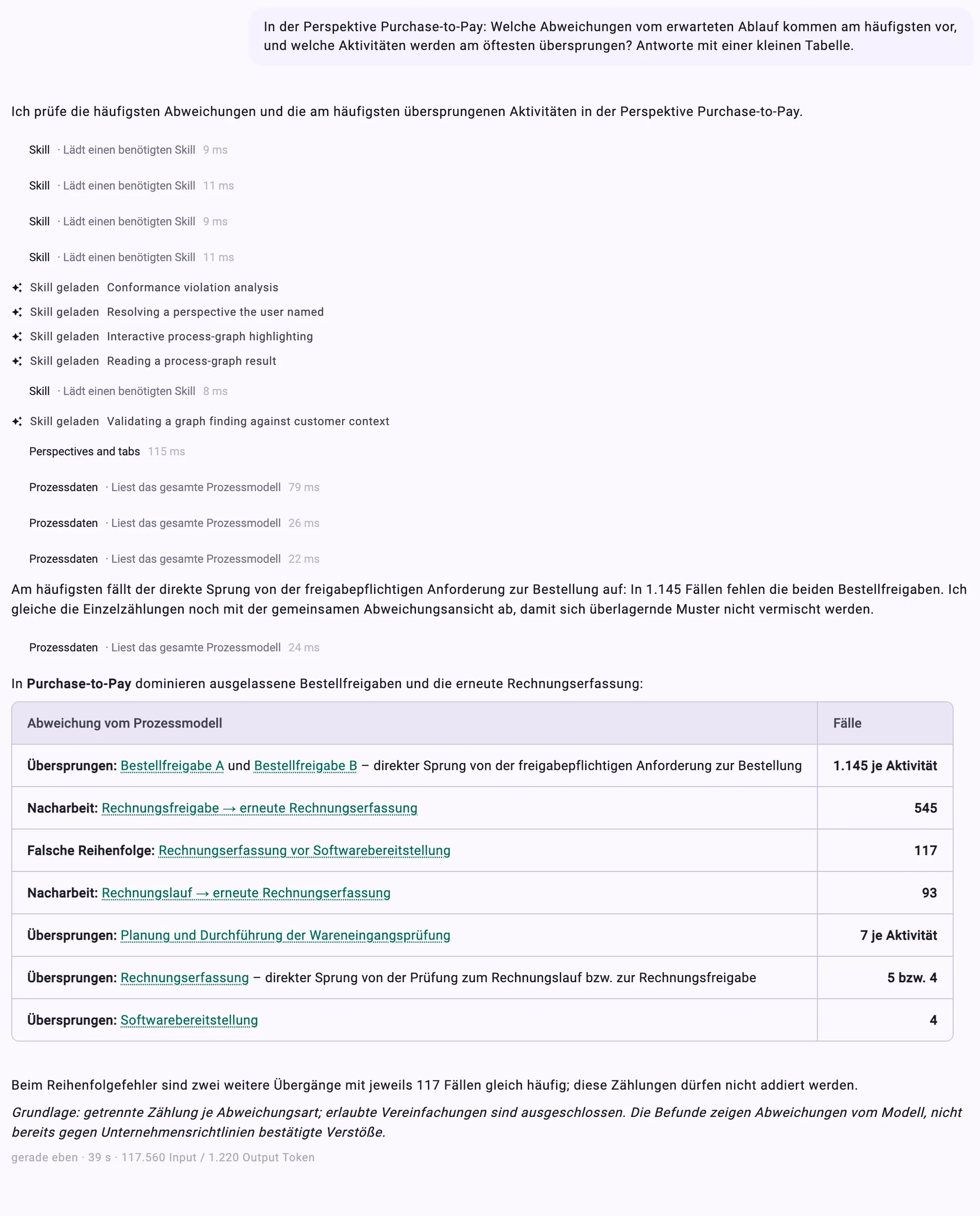
Chat with Minerva: a question about the purchase-to-pay perspective, below it the loaded skills, the process data read and an answer with KPIs and a table.
One question, one answer with a table – and every activity in it linked to the graph.
02 · Answers

Numbers, tables and charts

Minerva answers with what you need: a number, a small table, a flowchart or a timeline. Copy tables with one click or download them as CSV, charts as SVG or PNG. Cases and variants Minerva mentions open directly as a graph next to the chat.

If something is unclear – which perspective you mean, for instance – Minerva asks instead of guessing.

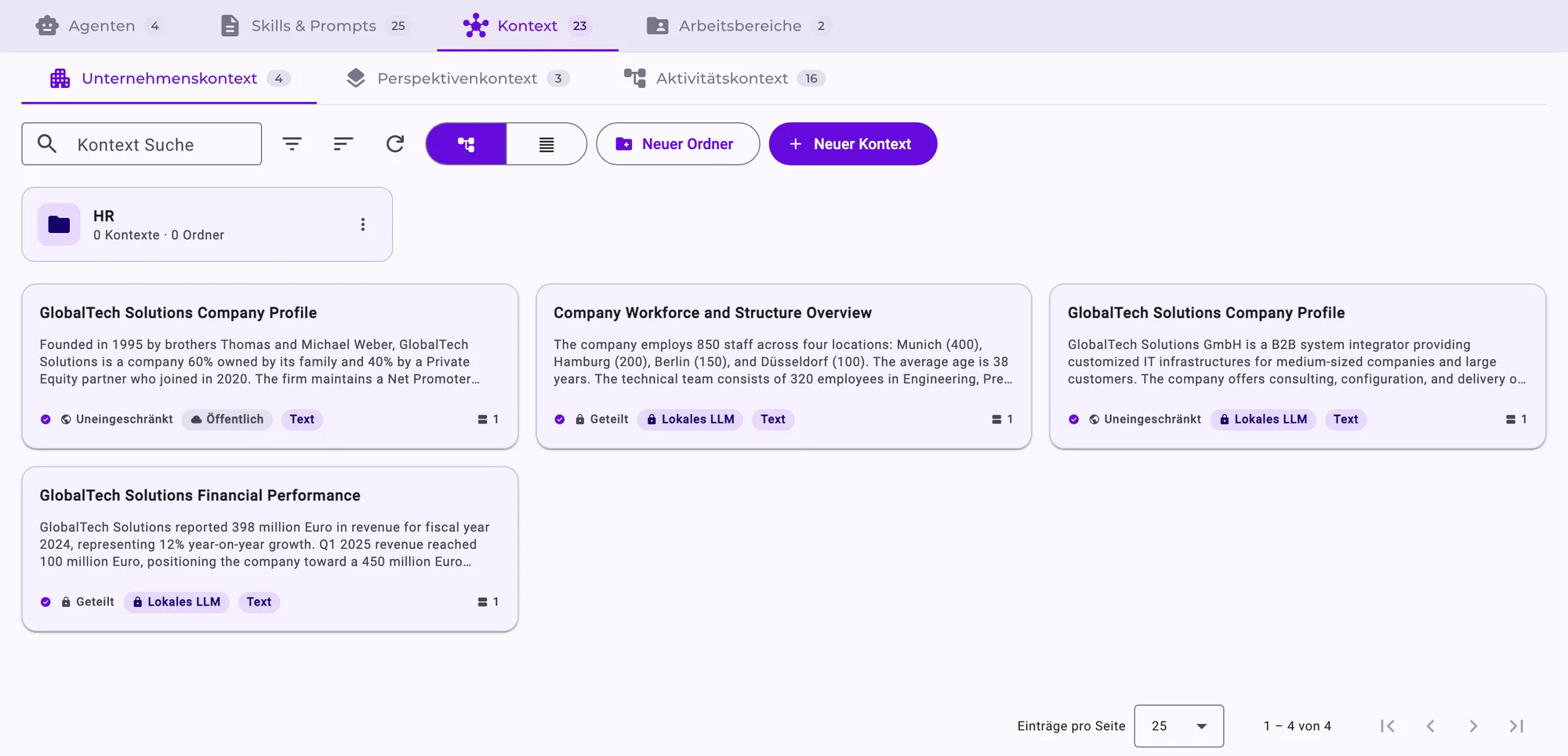
Context Hub in the AI Hub: cards with company knowledge, each with its sharing (for everyone or shared) and model restriction (public or local model only).
Context Hub: company knowledge with sharing and model restriction per entry.
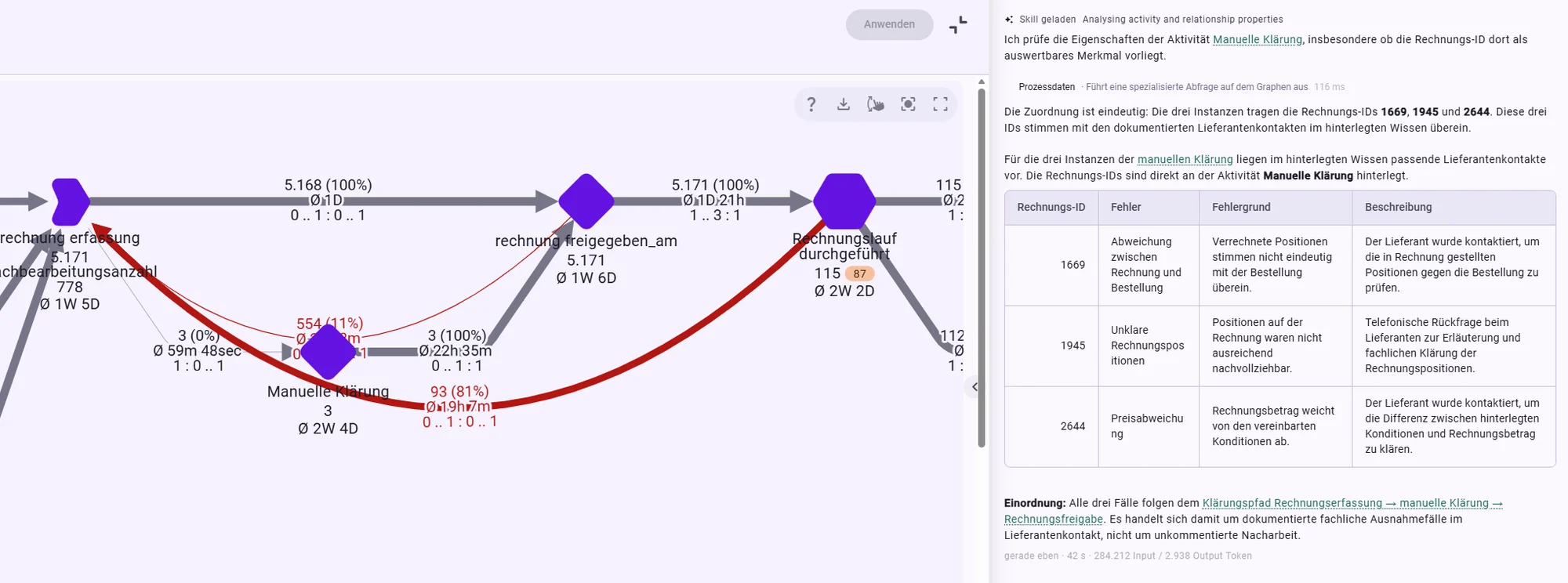
Minerva answer next to the process graph: table with invoice IDs and their clarification reasons from the ticket system.
From the purchase-to-pay analysis: Minerva links invoice rework to clarification reasons from the ticket system via the invoice ID.
03 · Context

Process data explains what happens. Company knowledge explains why.

A delay in purchasing can come from a strike, a new regulation or a supplier who never shows up in the event data. You keep this knowledge in the Context Hub: process descriptions, policies, org charts, known issues – as text or file, for the whole company, one perspective or a single activity.

Minerva searches this knowledge when a question asks why, and names the document she used. For every entry you decide who may use it and whether it may only be processed by local models.

Read the full case
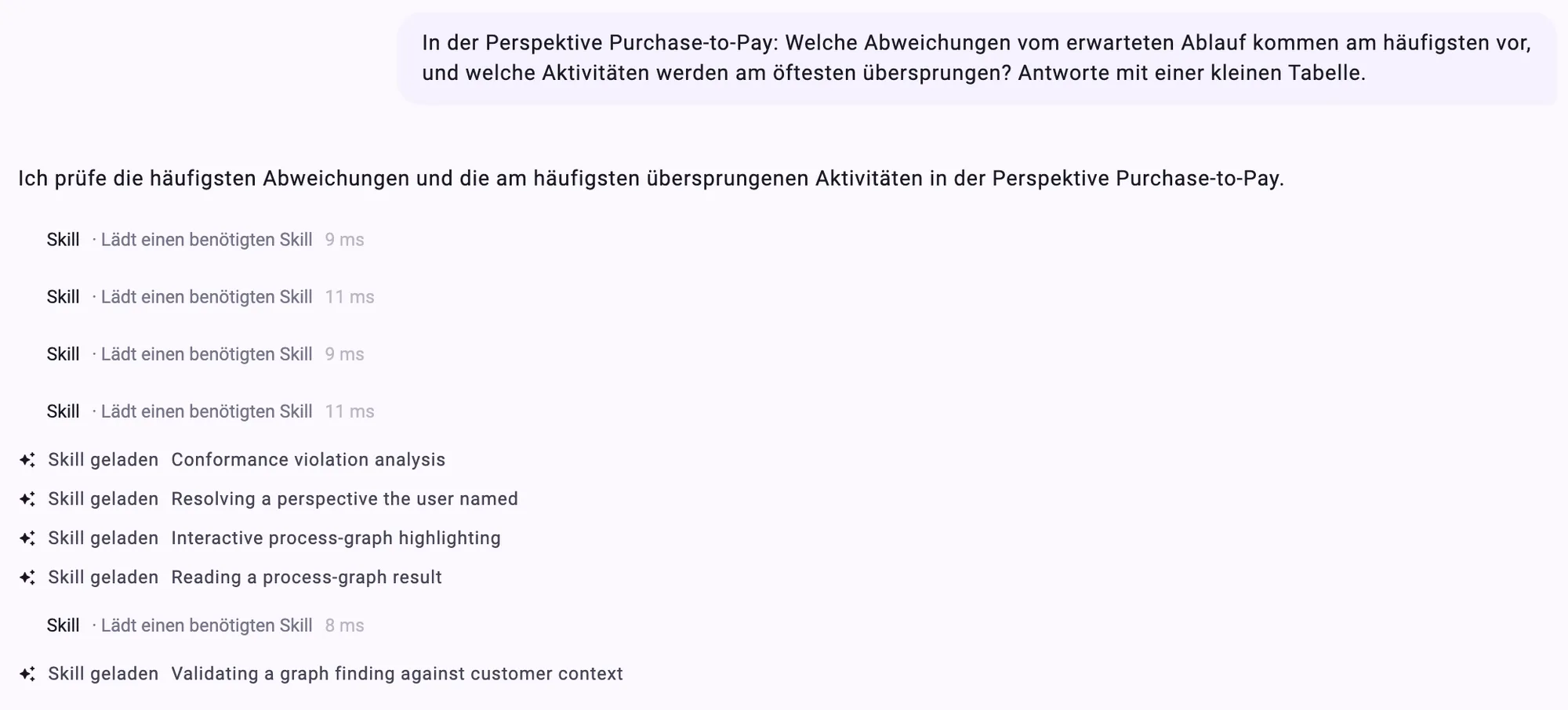
Minerva announces what she will check and shows every step in the chat: which skills she loads and why.
Every step visible: the announced plan and the loaded skills.
04 · Traceable

No black box

Minerva shows her work while she answers: which skills she loaded, which data she read, which parts sub-agents take over and which steps of the plan are still open. You can stop at any time, edit a question and ask again, or repeat the answer with a different model.

Below every answer you see how long it took and how many tokens it used; the cost of a chat is broken down by model and tool.

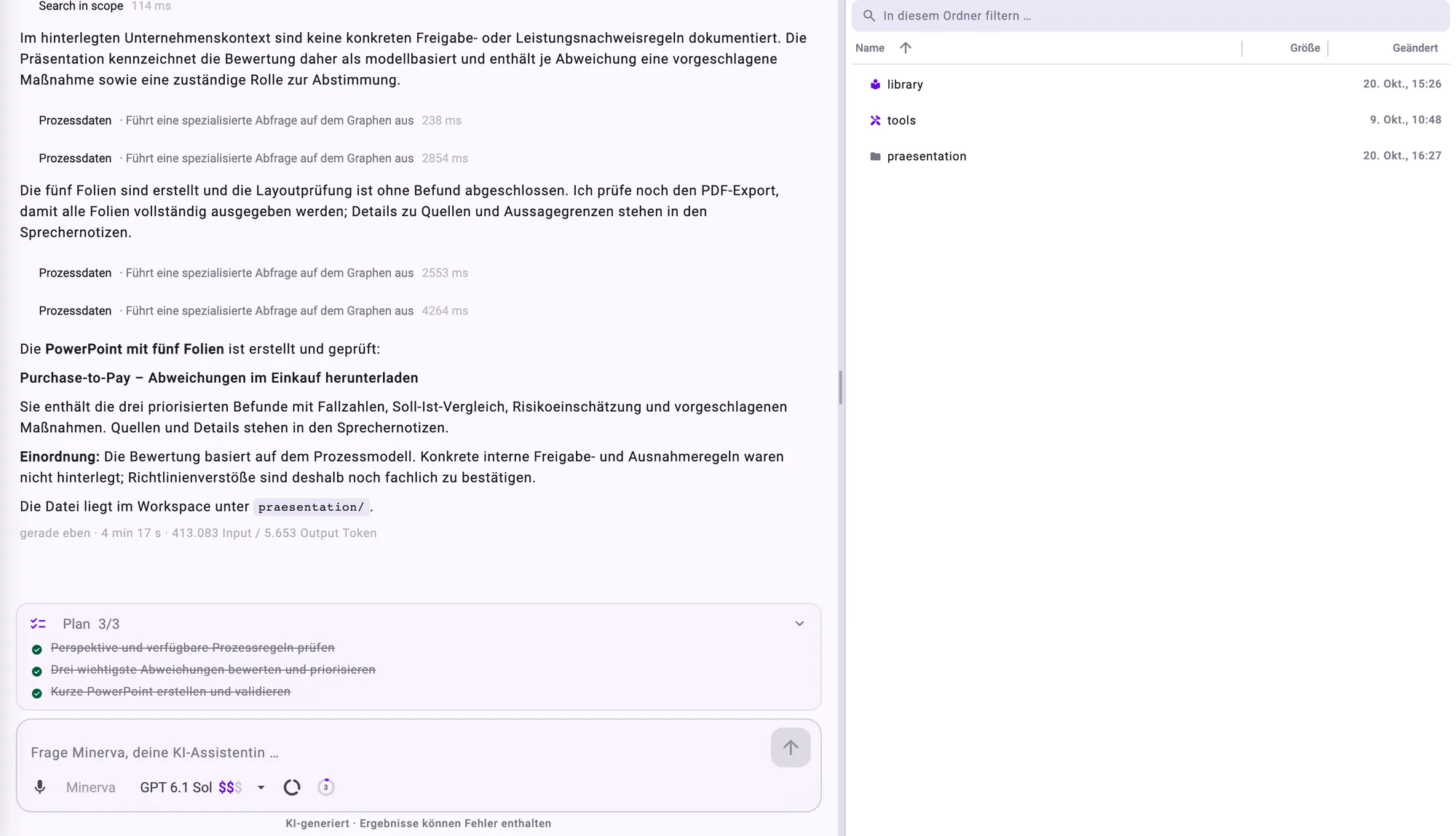
Minerva created a PowerPoint deck with the three most important deviations in the purchase-to-pay process; below it the completed three-step plan, on the right the workspace with the new folder.
From question to presentation – no export, no copy and paste.
05 · Files

Results you can pass on

Ask Minerva for the file you need:

  • Excel and CSV tables
  • Charts as images
  • Word and PDF documents
  • PowerPoint decks in your company colours and with your logo

The files land in your workspace. With shared workspaces a project team works on the same files; Minerva also reads what you upload there – CSV, Excel, Word, PowerPoint and PDF, scanned ones too. Everything Minerva creates is labelled as AI-generated.

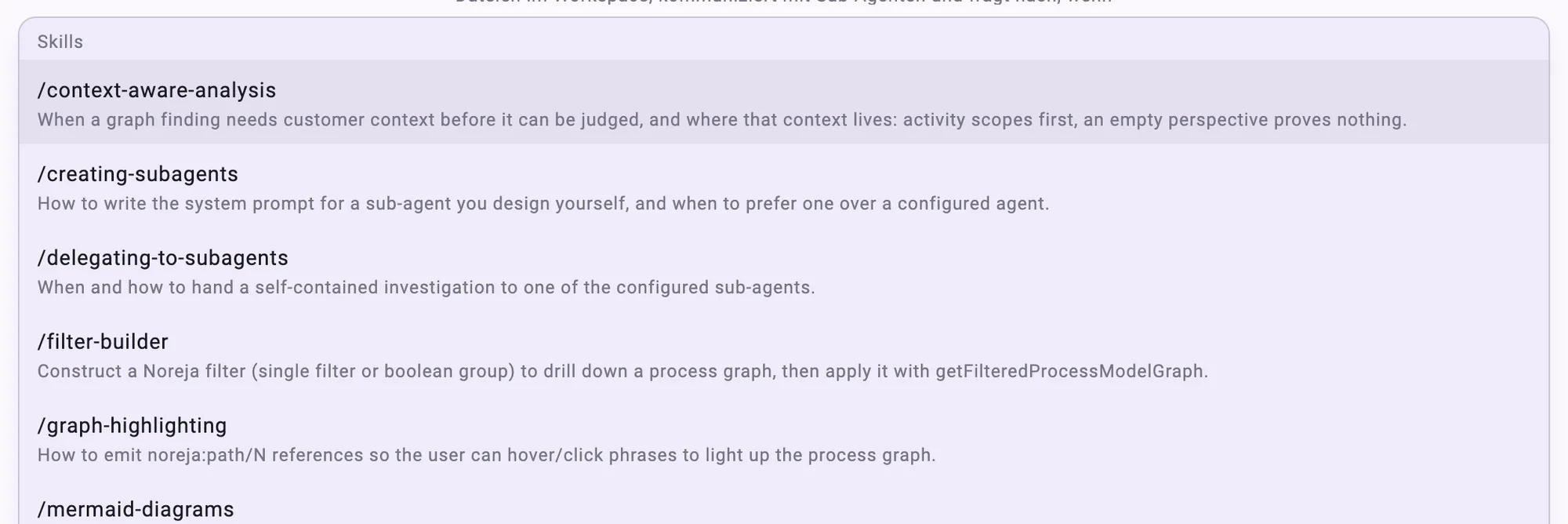
Chat input after typing “/”: list of the available skills.
A “/” in the chat opens the list of skills.
06 · Customisable

Your know-how as a skill

Every company has its own definitions: what counts as a late delivery? What belongs in a management briefing? In the AI Hub you write this knowledge down once as a skill – from then on Minerva applies it to every matching question. To use a skill on purpose, type “/” in the chat and pick it.

For special tasks you set up your own agents: with their own brief, selected skills, a fixed model and their own sharing for teams or departments.

What you can ask Minerva

Everyday questions – for every role

Process owners

“How many cases does the purchase-to-pay perspective have, and what is the average throughput time?”

“Where are the most deviations from the expected flow, and which activities are skipped most often?”

“Make a short presentation with the three most important findings for the process owner.”

Analysts

“Compare the variants with rework to the rest: how much longer do they take?”

“How many cases started in the first quarter, and how does their throughput time differ from all cases? Answer with a small table.”

“Create an Excel file with the slowest transitions of the last quarter.”

Everyone who works with Noreja

“Explain the selected case: why did it take so long?”

“What do the filters in this tab leave out?”

“How do I share a dashboard with my team?”

Your data, your control

Minerva sees no more than you do.

She reads only the perspectives, tabs and knowledge entries you have access to yourself. A perspective you may not open does not exist for Minerva.

  • Model selectable per chatLocal models run in Noreja's own infrastructure, external models with cloud providers. Noreja warns you before you switch to an external model.
  • Confidential knowledge stays localContext Hub entries marked “local model only” are never used with a cloud model.
  • Lock individual answersThe lock excludes a question and its answer from all later cloud requests in the chat. Answers from a local model never go to external models anyway.
  • Personal chatsOther users – administrators included – do not see your chats in their chat list.
  • Read-onlyMinerva changes nothing in Noreja – no imports, no perspectives, no filters.
  • LabelledFiles from Minerva are marked as AI-generated.
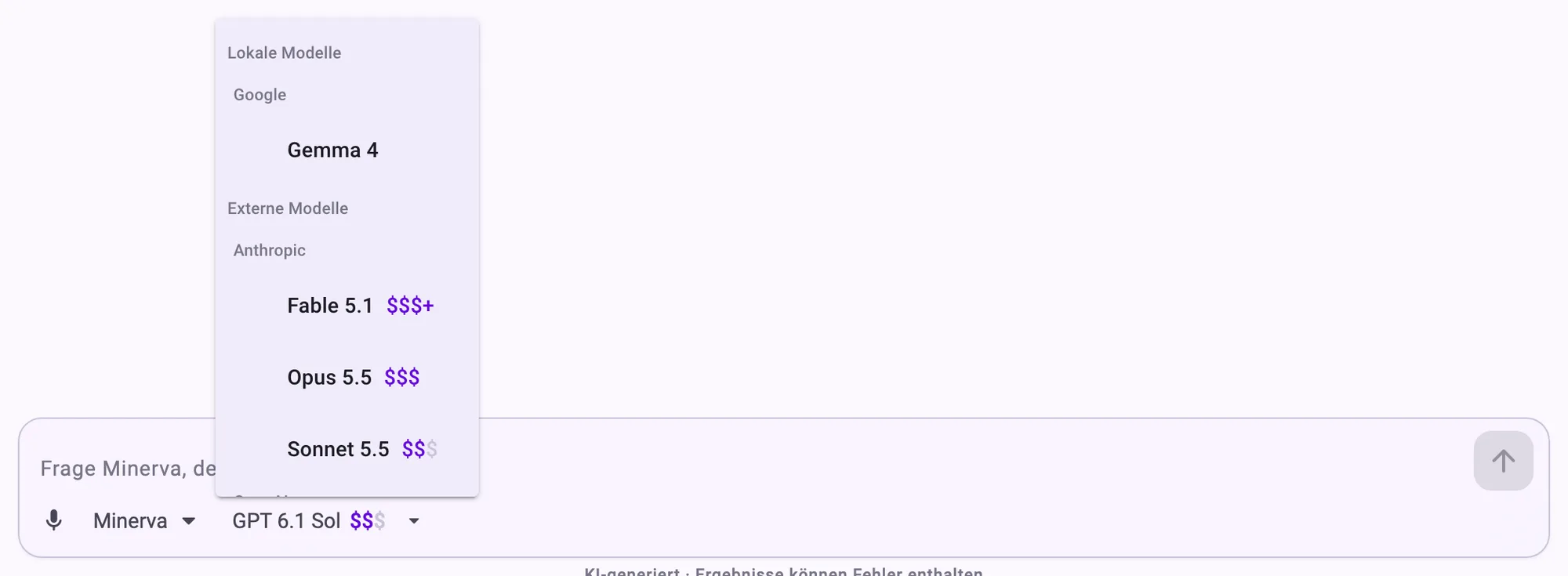
Model picker in the chat: local and external models, each with a price tier from $ to $$$+.
Model picker in the chat: local or external, with price tier.
ISO certifiedGDPR compliantVisit the Trust Center

Get started

Three steps to your first answer

1

Open Minerva

Switch on Minerva AI in the top bar to open her next to a dashboard or the Analyzer – or go to the chat page. On smartphones and tablets Noreja opens the chat directly.

2

Ask your question

Type or dictate your question and name the perspective it is about. Say which cases count and what you want back – a number, a table, a presentation.

3

Check and share

Follow the steps Minerva shows, check important numbers in the Analyzer and download tables, charts or files – or put them in the shared workspace for your team.

Minerva and the Frontier Agents

Minerva answers when you ask. The Minerva Frontier Agents go one step further: they work on a question continuously in the background, watch KPIs and get in touch as soon as something relevant changes.

See the Frontier Agents

Frequently asked questions

What is Minerva?

Minerva is the AI assistant in Noreja's process intelligence platform. She answers questions about your processes in natural language, reads the causal process graph and the company knowledge in the Context Hub to do so, and creates tables, charts, reports and presentations on request.

Which data does Minerva use?

The process data of the perspectives and Analyzer tabs you may open – including those shared with you –, company knowledge from the Context Hub, files in your workspace and the Noreja documentation. With selected cloud models Minerva can also search the web.

Which AI models can I use?

Local models running in Noreja's own infrastructure and external models from cloud providers. You choose the model in the chat; each model's price tier is shown. For local models there is also the “Minerva (On-Premise)” variant, tuned specifically for them.

Does my data leave the company?

Your question and the data Minerva reads for it go to the selected model. With a local model they stay in Noreja's infrastructure; with an external model they go to the cloud provider. Confidential knowledge entries and locked answers are only processed by local models. Dictation currently uses a speech service from OpenAI – if you would rather not, type instead.

Can Minerva change anything in Noreja?

No. Minerva reads process data but changes nothing: she imports no data, edits no perspectives and sets no filters in your tabs. She only creates files in your workspace.

How reliable are the answers?

Minerva calculates on the same data as the Analyzer and shows which data she read. Answers are still AI-generated and can contain errors, so check important numbers in the Analyzer before you pass them on.

Can we adapt Minerva to our company?

Yes. In the Context Hub you store company knowledge; in the AI Hub you write your own skills for your definitions and report formats, set up your own agents and store your colours and logo for the presentations.

Which language does Minerva answer in?

In the language of your question.

Who can use Minerva?

Everyone who has been given the right to chat in Noreja. There are also chat-only accounts: these users work only with Minerva and see only the process data released to them.

Still have a question? Get in touch.

Ready to start

Ask Minerva your first process question – with your data

In a demo we show you how Minerva finds root causes in one of your processes, explains them and turns them into a presentation.